Firefox extension for strict site and element blocking
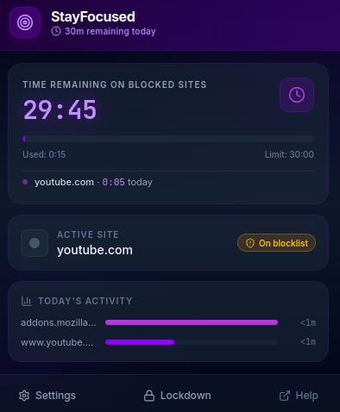
StayFocused, developed by Mohammad Anwar, is a Firefox extension that helps users block distracting websites and monitor browsing time. It enforces daily time budgets and a strict Lockdown Mode, and it can hide specific in-page elements to reduce temptation. The extension includes interactive usage analytics stored locally and a weekly Focus Hours scheduler. It targets students, remote workers, and professionals who need enforced limits and privacy-aware tracking to build disciplined browsing habits.
What does StayFocused change about everyday browsing?
StayFocused installs inside the desktop browser and limits access to specified hosts with configurable daily time budgets that lock sites when exhausted. A Lockdown Mode blocks chosen sites for set intervals, and a Focus Hours scheduler automates restriction windows across the week. The extension presents interactive charts that track browsing by category, and all tracking data remains stored locally in the browser, not sent externally.
How much control does it give over distracting content?
The extension provides fine-grained, in-page controls that hide parts of a site rather than blocking the whole host. In-App Blocking targets page fragments such as:
- recommendations and sidebars
- YouTube Shorts and similar short-form feeds
- Instagram Reels and comments sections
Challenge Protection enforces deliberate changes by requiring manual typing of long random strings without copy-paste, which raises the effort needed to bypass rules.
Is setup straightforward and what about system impact?
Installation is typical for a desktop browser add-on; the extension supports Firefox and is compatible with Chrome. Because analytics and enforcement run inside the browser, StayFocused stays active while the browser is open and stores data locally. The source does not publish CPU or memory numbers; users who need minimal background overhead should note that charts and in-page scripts execute within the browser process rather than as a separate service.
Who this fits and a practical tip
StayFocused is a strict option for students and professionals who want enforced browsing limits combined with local-only analytics. Mohammad Anwar focuses on productivity extensions, which aligns the tool with individual users comfortable adding browser add-ons. Practical tip: use the calendar heatmap to assign Focus Hours that match class or work schedules. Users preferring lighter, passive tracking may prefer simpler blockers instead in practice.